
Full text history search lets you find a page you visited by the words that were on it. Three browser extensions that do this are Memory, Falcon and Datarag. Datarag is a browser extension that saves and indexes everything you read online, so you can search your full browsing history in plain language — or ask an AI about it. The sections below compare all three on price, privacy and browser support, with Chrome's own opt-in AI history search as the baseline.
How do Memory, Falcon and Datarag compare?
Memory, Falcon, Datarag and Chrome's opt-in AI history search all index the text of pages you visit, but they differ on where that index lives and which browsers they run in. By default, Chrome's history stores only page titles and URLs, so each option here is a step up from it. Memory wins on a free plan, Falcon on open code, and Datarag on one history across browsers.
The biggest split is storage. Falcon and Chrome keep your index on the device. Memory says its Free plan does, but it sells encrypted sync on Pro. Datarag syncs your index in encrypted form.
Prices and features are as listed on each vendor's page on November 24, 2026.
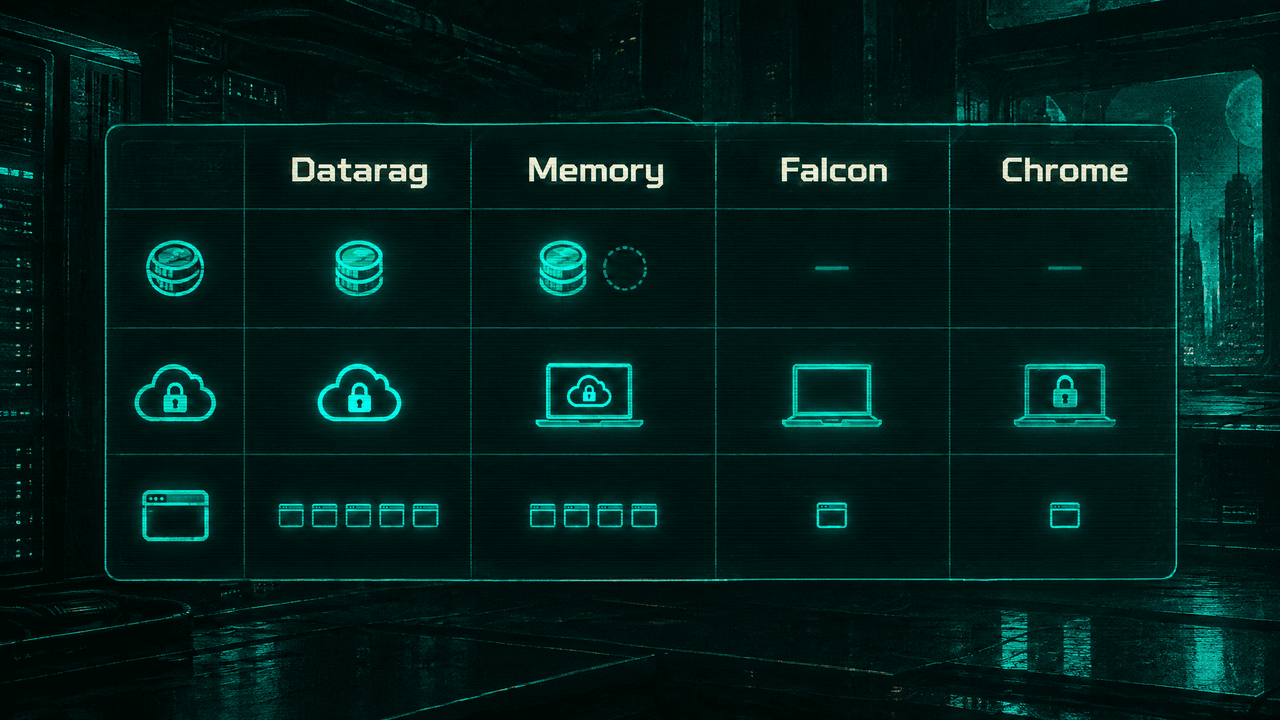
What does each tool cost?
Memory is the only one of the three extensions that lists a free plan. Its Free plan covers full-text search, exclude lists and local storage at $0. Pro costs $4.99 a month or $39 a year and adds AI search, YouTube and PDF support, and cross-device sync. A one-time Lifetime plan costs $79.99.
Datarag costs $2.99 per month after a 30-day free trial, and the trial needs no credit card. That is the lowest monthly price among the paid plans here, and it includes sync and AI chat. You can cancel anytime, and tax is added at checkout.
Falcon's README lists no price. Chrome's AI history search is part of Chrome, so there's nothing extra to install. If you're weighing a paid tool against another memory app, our SurfMind pricing comparison covers that pairing.
Does "local-first" mean your history never leaves your device?
A local-first claim covers where the index is stored, and you should check what happens to the features around it. Memory's homepage calls the extension local-first and says "your data never leaves your device." It adds that history is stored locally in IndexedDB, "not the cloud." IndexedDB is a database built into the browser.
The same page sells Pro with "Encrypted sync across your devices." Pro's AI search runs on "Natural language queries powered by your own API key." The page doesn't reconcile sync with the local-only promise. It also doesn't say where AI queries are sent.
Falcon's README is plainer. It says all information is stored locally and "no data leaves your computer over the network." The README describes no sync or AI features that would complicate that. Chrome's opt-in AI history search also saves page contents encrypted on the device.
Before you install any of these, ask the vendor three questions:
Where does my index live, and does sync send a copy anywhere?
Who holds the key that decrypts a synced copy?
Which server receives my AI questions, and what text goes with them?
Datarag's answers to the first two are short. Your history is stored on Datarag's servers, encrypted with a key derived from your PIN, and the PIN never leaves your device. The servers store only data they can't decrypt, and data is decrypted in memory per request, then wiped. Datarag never uses your data to train AI. There's more on its security page.
What do you give up with an open-source extension like Falcon?
Falcon trades convenience for code you can read. Its README says Falcon "indexes all the text on the page." You type f and then space or tab in the address bar to search. The before: and after: operators limit results to a time range.
Falcon's matching is strict: "Only documents containing all words will be returned." A developer who remembers an exact error message will do well with that. A student who remembers only the idea of a source may miss the page.
Falcon also skips pages by design. It keeps a blacklist that includes "the majority of banking websites," which you can edit in its preferences. Datarag takes a similar approach and automatically excludes adult sites, gambling pages and social media networks.
The README suggests installing from source so you can check the code first. It then warns that you "won't receive any automatic updates" that way. You get to audit the code, and in return you take on the job of keeping it current.
Which browsers does each extension support?
Datarag runs in the widest set of browsers: Chrome, Edge, Brave, Arc, other Chromium-based browsers and Mozilla Firefox. Memory lists Chrome, Edge, Brave and Arc. Falcon's README names only Chrome.
Chrome's AI history search is narrower. It's available only in the US, with Chrome in English, and it only stores pages you visit after you turn it on. Gemini in Chrome can also search your history, but it needs a personal Google Account and synced history.
Browser support matters most if you switch. A PM who reads competitor pages in Arc at work and in Firefox at home needs one history across both. Datarag syncs your history across browsers and devices, so a search on either one covers both.
How does Datarag search your history?
Datarag indexes the full content of every page you read, not just its title or URL. You search by describing what you remember, in plain language. The Datarag vs Chrome history page shows the difference side by side. Your browser history knows the URL. Datarag knows what was on the page.
Datarag keeps your browsing history permanently. Chrome's built-in history keeps roughly 90 days and deletes older entries automatically. A student rebuilding thesis sources from last semester needs pages older than that window.
Datarag also indexes YouTube subtitles, so a video is searchable by what was said in it. In the AI chat, you can pin one or several pages to scope your questions to exactly those pages. A PM can pin three competitor pricing pages and ask how they differ.
Datarag never captures incognito browsing, and you can toggle indexing off at any time. For the step-by-step version, read how to search your browsing history by content.
Which full-text history tool fits you?
Pick Memory if a free tier matters most and you browse only in Chromium browsers. Pick Falcon if you want open-source code, keep your index on one machine and search with exact words. Pick Chrome's AI history search if you're in the US, use Chrome in English and want nothing to install. Pick Datarag if you need one permanent, plain-language history across Chromium browsers and Firefox, with AI chat over what you read.
Datarag is free for 30 days, with no credit card required. Add to Chrome.
Frequently asked questions
What happens to my Datarag history if I forget my PIN?
Your data can't be recovered, even by Datarag, and must be reset. Datarag encrypts your data with a key derived from your PIN, and the PIN never leaves your device. Datarag's servers store only data they can't decrypt.
Can other AI assistants search my browsing history?
Yes, if your history is in Datarag. Datarag includes an MCP server, so external AI assistants can query your personal web memory directly. MCP (Model Context Protocol) is an open standard that lets AI assistants connect to external data sources and tools.
What happens to my Datarag history if I delete my account?
Datarag deletes all your data immediately when you delete your account. If you only want to stop saving pages for a while, you can toggle indexing off at any time instead.